tuneup-lab-docs
Valve Sound Check
MotoWrench can listen to your DR650’s engine and give you a quick read on whether your valve clearances are still in spec – or if it’s time to break out the feeler gauges.
What It Does
Valve Sound Check records your engine at idle and compares it to two known reference recordings bundled with the app:
- On-spec reference – a DR650 with valves freshly adjusted to factory clearance (intake 0.08–0.13 mm, exhaust 0.17–0.22 mm).
- Loose reference – a DR650 with known excessive valve clearance.
The comparison happens three ways at once:
- Audio – Gemini AI listens to all three recordings and compares the character of the ticking.
- Spectrogram image – A visual frequency map of your recording is placed side-by-side with the reference so the AI can see differences in the 2–6 kHz band where valve clicks show up.
- DSP metrics – The app runs signal processing on your recording to measure things like how spiky the clicks are, how rhythmic they are, and how many there are per second.
All three are sent to Google’s Gemini AI, which weighs the evidence and returns a verdict.
How to Use It
-
Warm up your bike. Ride for at least 5 minutes or let it idle until the engine is at normal operating temperature. Cold engines sound different.
-
Find a quiet spot. Wind, traffic, and other bikes will confuse the analysis. A garage or quiet driveway works best.
-
Open MotoWrench and go to the AI Mechanic tab. Tap Valve Sound Check.
-
Hold your phone about 30 cm (1 foot) from the engine – roughly at cylinder-head height. Keep it steady.
-
Tap the red Record button. The app records for 10 seconds. You’ll see a live audio level ring while it’s recording. You can also tap “Stop Early” if needed, but a full 10 seconds gives the best results.
-
Wait for the results. First, local analysis runs instantly. Then the recording is sent to Gemini AI for the comparative verdict (this takes a few seconds on a good connection).
-
Read the verdict and, if you want, expand the “Signal details” section to see the spectrogram and raw numbers.
-
Share the recording if you want a second opinion – tap “Share WAV” to export the raw audio file.
Understanding the Results
The Verdict
The AI returns one of four verdicts:
| Verdict | What it means | Icon |
|---|---|---|
| On-spec | Your valve ticking sounds similar to the freshly-adjusted reference. No action needed. | Green checkmark |
| Tight | Less mechanical ticking than expected. The valves may have closed up – schedule an adjustment. | Orange wrench |
| Loose | More pronounced, harsher ticking than the reference. Excessive clearance – schedule an adjustment. | Yellow warning |
| Not engine | The recording doesn’t sound like a running engine. Try again with the bike idling. | Mic-slash |
Each verdict comes with a confidence level (Low, Medium, or High) and a plain-English explanation of what the AI heard.
The Spectrogram
If you expand “Signal details,” you’ll see a side-by-side spectrogram image:
- Top panel – the on-spec reference recording.
- Bottom panel – your engine.
The spectrogram shows frequency on the vertical axis and time on the horizontal axis. Bright spots mean more energy at that frequency. Valve clicks show up as bright vertical spikes in the 2–6 kHz band (marked with a bracket on the right edge).
What to look for:
- Similar brightness in the click band = on-spec.
- Dimmer / fewer spikes in your recording = possibly tight valves.
- Brighter / more frequent spikes = possibly loose valves.
DSP Metrics
Below the spectrogram, you’ll find five numbers. Here’s what they mean in plain English:
| Metric | What it measures | Higher means… |
|---|---|---|
| Tick Score | Overall “clickiness” (combines periodicity and spikiness) | More valve ticking |
| Kurtosis | How sharp and spiky the clicks are in the 2–6 kHz band | Sharper, more impulsive clicks |
| Tick Periodicity (TPS) | How rhythmically the clicks repeat | More regular, metronomic ticking |
| Clicks/sec | How many distinct click events per second | More frequent ticking |
| Estimated RPM | Engine speed derived from the tick repetition rate | Faster idle |
For reference, here’s roughly what these numbers look like at each valve state:
| State | Tick Score | Kurtosis | TPS | Clicks/sec |
|---|---|---|---|---|
| Tight | ~0.05 | ~0.4 | 0.37 | ~0 |
| On-spec | ~0.17 | ~2.3 | 0.50 | ~0.7 |
| Loose | ~0.52 | ~10 | 0.72 | ~5.1 |
The numbers form a smooth progression from tight to loose. If your numbers fall between two rows, you’re somewhere in between.
Why do these numbers change with valve clearance? The valves always open and close at the same rate — that’s set by the camshaft. What changes is how hard the rocker arm contacts the valve stem, and that depends on the gap.
-
TPS (Tick Periodicity Strength): Loose valves have a bigger gap, so the rocker arm hits harder and produces a sharp click that stands out clearly from combustion noise. The app’s autocorrelation picks up that repeating pattern easily — high TPS. Tight valves have almost no gap, so the click is buried in noise and the pattern is hard to detect — low TPS. TPS measures how clearly the ticking shows up, not how fast it repeats.
-
Kurtosis: Think of this as “spikiness.” A smooth, combustion-dominated sound has low kurtosis. Add sharp valve clicks on top and the signal becomes spiky — high kurtosis. Loose valves produce loud, impulsive clicks that spike well above the background, pushing kurtosis up. Tight valves produce a smoother signal with fewer spikes.
-
Tick Score: This combines TPS and kurtosis into a single number. It’s high only when the clicks are both spiky (high kurtosis) and rhythmic (high TPS). Random noise can be spiky but not periodic. A smooth engine hum can be periodic but not spiky. Only real valve ticking scores high on both — that’s the point of combining them.
-
Clicks/sec: The simplest metric — how many distinct click events the app counted per second. Loose valves produce clear, countable clicks. Tight valves produce so few audible clicks that the count drops toward zero.
Click Envelope Chart
The chart labeled “Click envelope” shows the transient energy in the valve click band over the duration of your recording. Tall spikes are individual valve click events. A steady pattern of spikes means rhythmic, consistent ticking.
How It Works Under the Hood
The Analysis Pipeline
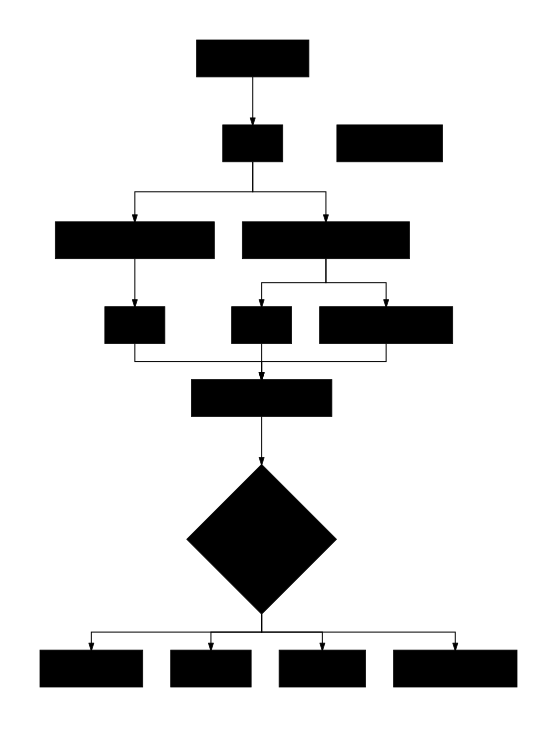
Here’s the step-by-step:
-
Recording. The app captures 10 seconds of mono audio at your device’s native sample rate (typically 44.1 kHz) using iOS’s AVAudioEngine in measurement mode for a flat frequency response.
- Local DSP analysis. Runs instantly on your phone:
- Bandpass filter isolates the 2–6 kHz valve click band.
- Transient extraction separates sharp valve clicks (~1 ms) from broader combustion pulses (~10–20 ms).
- Computes kurtosis (spikiness), autocorrelation-based periodicity, click counting, and tick score.
-
Downsampling. The recording is downsampled from 44.1 kHz to 16 kHz for upload efficiency.
-
Spectrogram rendering. A mel spectrogram is generated for both the bundled reference and your recording, then composited into a single comparison image (reference on top, yours on bottom). This uses 128 mel frequency bins, 2048-sample FFT windows, and a 512-sample hop size.
- Gemini AI analysis. Three things are sent to Google’s Gemini 3.1 Pro model in a single request:
Tri-Modal Data Sent to Gemini
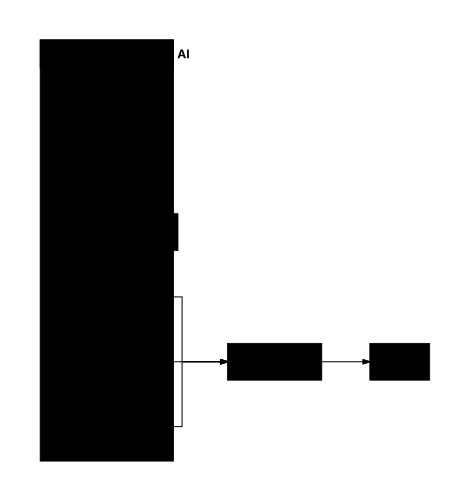
- Three audio files (WAV): the on-spec reference, the loose reference, and your recording – each explicitly labeled so the AI knows which is which.
- One spectrogram image (PNG): the side-by-side mel spectrogram comparison.
- DSP metrics (text): the numerical measurements from step 2, for both your recording and the reference.
- Chain-of-thought prompting. The AI is instructed to follow a structured analysis:
- First describe what it hears in the reference.
- Then describe what it hears in your recording.
- Compare the two.
- Only then deliver a verdict.
This step-by-step reasoning produces more accurate results than asking for a verdict directly.
- Verdict display. The app parses the AI’s structured response and shows you the verdict, confidence level, and explanation.
Limitations
This is a rough comparison tool, not a diagnostic instrument. Please keep these in mind:
-
Always verify with feeler gauges. The only way to know your actual valve clearance is to measure it. This feature gives you a heads-up, not a measurement.
-
DR650 specific. The reference recordings and DSP calibration are from a Suzuki DR650. Using this on a different engine will produce meaningless results.
-
Recording quality matters. Wind, background noise, exhaust rumble, and phone position all affect accuracy. A quiet garage with the phone held steady at 30 cm gives the best results.
-
Phone microphones vary. Different phones have different frequency responses. The AI accounts for typical phone mic roll-off, but extreme differences could affect the verdict.
-
Not a substitute for scheduled maintenance. Even if the sound check says “on-spec,” follow your maintenance schedule. Valves can be slightly out of spec without it being obvious in the sound.
-
AI confidence varies. A “Low confidence” verdict means the AI isn’t sure – don’t make maintenance decisions based on low-confidence results alone.
-
Requires internet. The AI analysis is done by Gemini on Google’s servers. The local DSP metrics work offline, but you won’t get the AI verdict without a connection.
-
Factory clearance specs for reference:
- Intake: 0.08–0.13 mm
- Exhaust: 0.17–0.22 mm